Basic Math
  Pre Algebra
 Algebra I
  Algebra I
 Algebra II
  Geometry
  Trigonometry
  Precalculus
  Math Analysis
  AP Calculus AB
  AP Calculus BC
 AP Statistics
 Gen. Statistics
  Gen. Statistics
 Probability
  College Calculus: Level I
 College Calculus: Level II
  Multivariable Calculus
  Linear Algebra
  Differential Equations
  General Chemistry
  Gen. Chemistry
 AP Chemistry
  Biochemistry
  Organic Chemistry
  Organic Chemistry Lab
  Physical Chemistry
  Physics – High School (Theory & Application)
  AP Physics 1 & 2
  AP Physics C: Mechanics
  AP Physics C: Electricity & Magnetism
  AP Physics B
 AP Physics C: Mechanics
 AP Physics C: Electricity Magnetism
 Life Science (Middle School)
 Regular Biology
 Anatomy & Physiology
  General Biology
  AP Biology
  AP Environmental Science
 Microbiology
 Molecular Biology
  Intro to Psychology
 AP Psychology
 AP US History
 AP World History
 HTML Training
 HTML 5
 Intro to Ruby Programming
 Web Design & E-Commerce
 Introduction to C++
 Intermediate Level C++
 CSS Intro
 Java
Java
 AP CompSci: Intro to Java
 JavaScript
 Introduction to PHP
 Advanced PHP Training w/ mySQL
 C#
C#
 Visual Basic
 XML Training
 QuickBooks (How-To Guide)
 MATLAB
 Excel Power Query







 Adobe Dreamweaver CC
 Adobe Dreamweaver CS6
 Adobe Photoshop CS6
 Photoshop Designs to Code
 Edge Animate CC
 jQuery Mobile
 Adobe Illustrator CS6
 Adobe Premiere Pro CS6
 Adobe Premiere Elements 11
 ColdFusion 9
 ColdFusion 9: Application Framework
 Fireworks CS6: Web Workflow
 Adobe Photoshop Elements 11
 English Grammar
 Advanced English Grammar
 English Composition
 Application Essays
 AP English Language & Composition
 AP English Literature & Composition
 Shakespeare: Plays & Sonnets
 Reading Comprehension
 AP Spanish
 AP Studio Art 2-D
 Music Composition
 Music Theory
 Music History & Appreciation
 Learn Piano for Beatmakers and Producers
 Answer Engine

Frequently Asked Questions
Frequently Asked Questions
Viewing Lessons
1. How do I play the lesson videos?
4. Are there keyboard shortcuts for the video player?
5. How do I skip ahead for the lectures that I've already watched?
Account Management
6. How do I access my account?
7. How do I reset my password?
8. Do I need to fully complete my user profile?
Billing
9. What are acceptable forms of payment?
10. What are the different types of subscriptions?
11. What do I receive in the subscription?
12. What is the cancellation policy?
13. How do I cancel my Monthly Subscription?
14. Why am I getting charged this month?
15. I was a previous monthly subscriber, if I re-subscribe, will I have to pay $45 for the first month?
Service
16. How do I locate my problem topic?
17. How do I download lesson slides?
18. Can I log into the Educator.com using different computers?
20. Will there be more topics and features?
Miscellaneous
21. How do I become a teacher on Educator.com?
22. Are you on social media sites?
1. How do I play the lesson videos?
Please refer to the System Requirements page to see details on minimum screen resolution, programs, and bandwidth
4. Are there keyboard shortcuts for the video player?
Left/Right: Reverse or Fast Forward
Up/Down: Volume
Spacebar: Pause or Resume
5. How do I skip ahead for the lectures that I've already watched?
Please follow these 2 steps to store already viewed lectures on your computer.
| Step 1. | Step 2. |
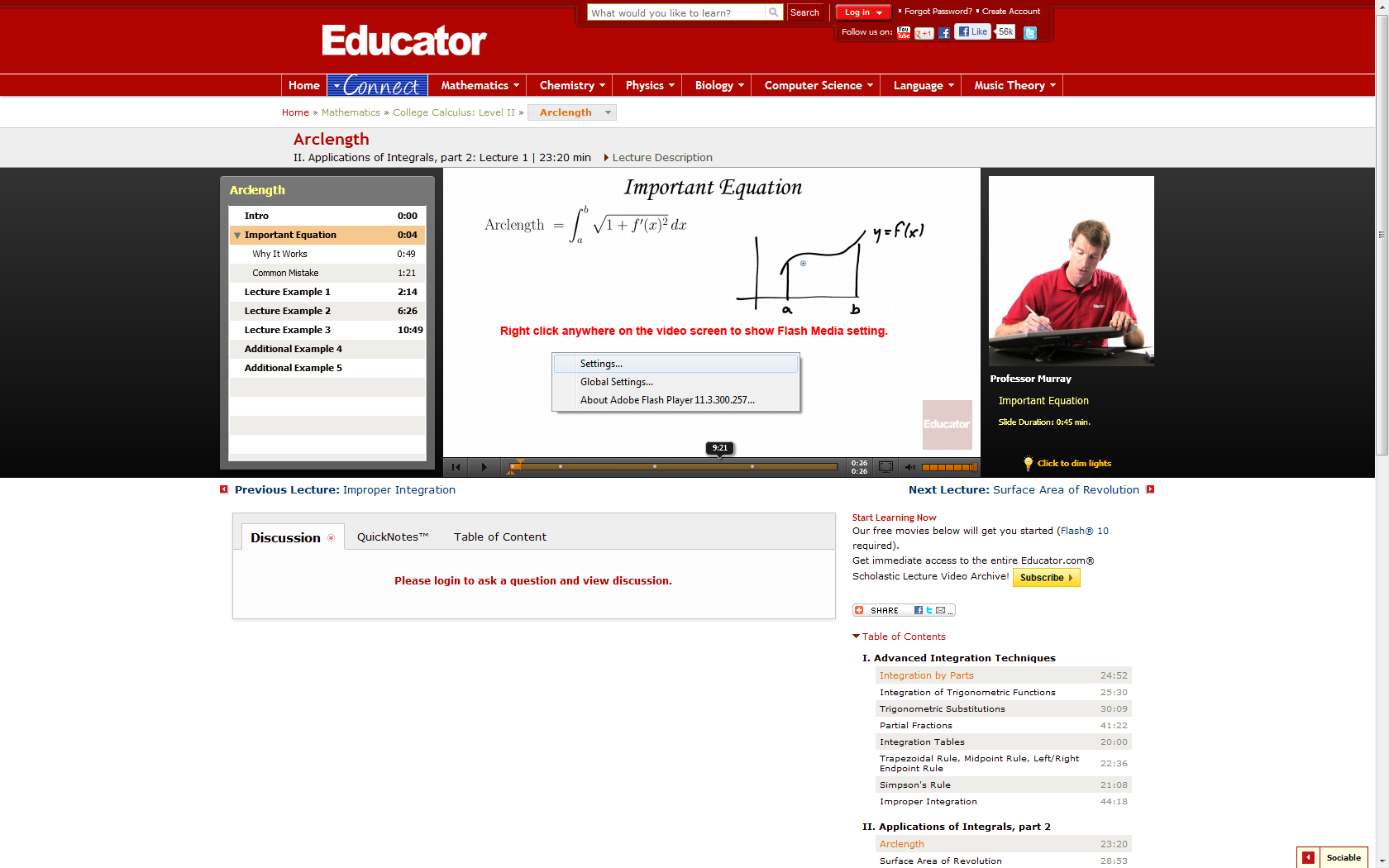 | 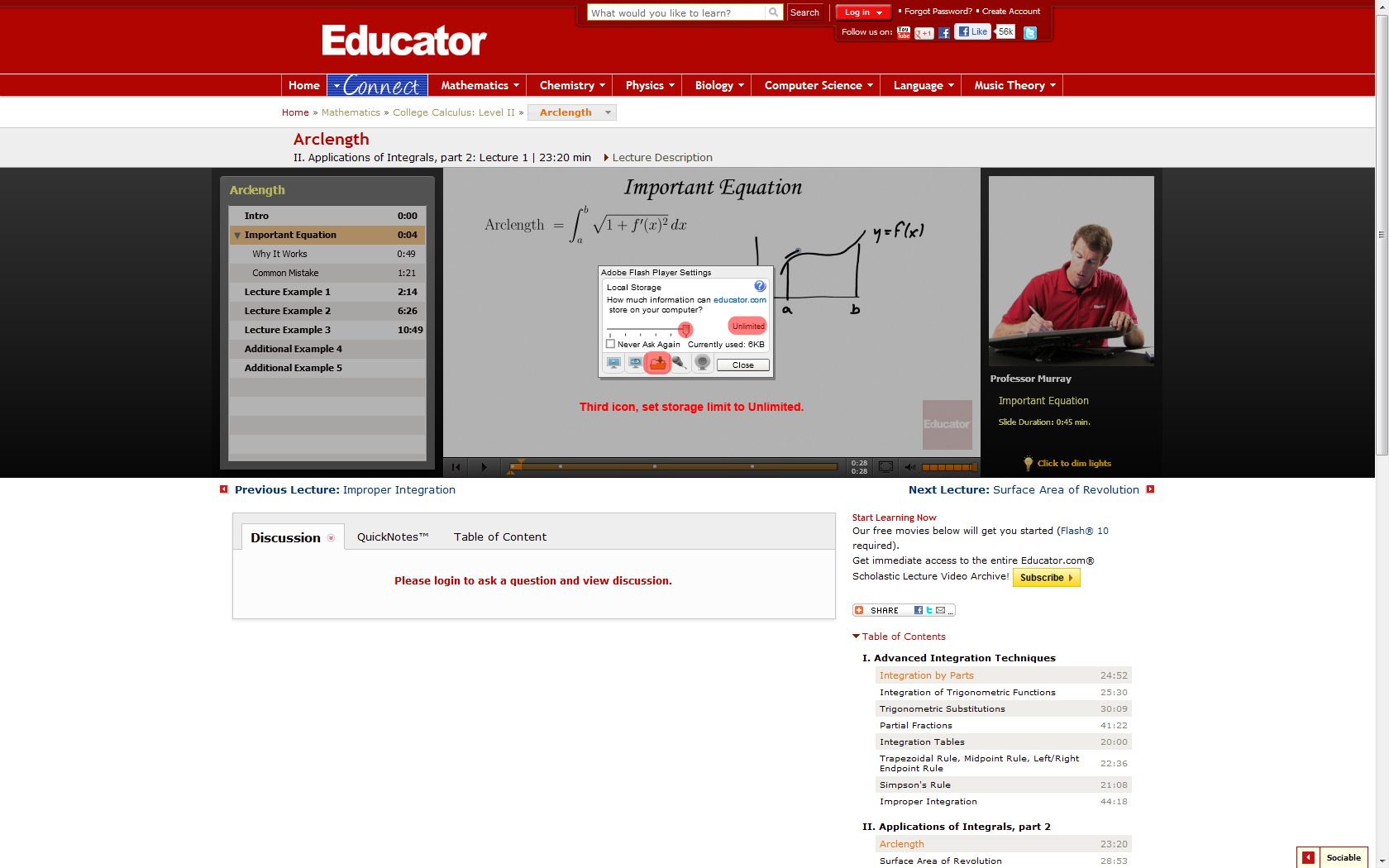 |
6. How do I access my account?
To access your account, log in and click on your name in the top right corner.
7. How do I reset my password?
To reset your password, please visit this link: http://www.educator.com/membership/login.php and follow the instructions.
8. Do I need to fully complete my user profile?
You do not need to enter more specific data, but doing so makes your learning experience more valuable in the student commenting and messaging aspects of Educator.
9. What are acceptable forms of payment?
We currently accept PayPal and all major credit cards (Visa, MasterCard, and American Express).
10. What are the different types of subscriptions?
All subscriptions give you full access to all our complete library of courses. Monthly Subscriptions is $45 for the first month, and then recurring $35 per month thereafter. Half Annual Subscriptions are $180 lump sum for 6 months ($30/month) while the Annual Subscription is $300 lump sum for 12 months ($25/month). Both Half Annual and Annual Subscriptions are non-recurring.
11. What do I receive in the subscription?
You receive unlimited access to all entire library of courses as well as all future releases for the duration of your subscription. You will also receive practice problems with step-by-step solutions, downloadable lesson files & slides, and ability to ask questions! (Answered by our students and instructors)
12. What is the cancellation policy?
For the monthly recurring subscriptions, you can cancel any time and will be able to use any remaining time from your account. For 6-Month and Annual Subscriptions, there is no need for cancellation of subscriptions as they are non-recurring and will automatically stop after the duration ends.
If you would like to re-subscribe, simply log back in, and you will be prompted to the account management page.
13. How do I cancel my Monthly Subscription?
- For credit card subscribers, log in and click on your name in the top right corner. Then go to “Edit Subscriptions” and push “Delete” next to your monthly plan to cancel.
You will be able to use the remaining time from your subscription until expiration. - For PayPal users, log in to your PayPal account and cancel the subscription. You will receive a confirmation email from PayPal.
You will be able to use the remaining time from your subscription until expiration.
If you would like to re-subscribe, simply log back in, and you will be prompted to the account management page.
14. Why am I being charged this month?
The Monthly Subscription is recurring in order to ensure uninterrupted service for students. During signup, it was clearly stated that the Monthly Subscription is $45 for the first month and then recurring at $35 per month thereafter until cancel. For more details, please see our Terms of Service. 6-Month ($180, $30/month) and Annual Subscriptions ($300, $25/month) are one-time payment and non-recurring.
15. I was a previous monthly subscriber, if I re-subscribe, will I have to pay $45 for the first month?
Our current Monthly Subscription resets to $45 for the first month and $35 per month thereafter each time you cancel, even if you were a previous member who already paid the $45.
16. How do I locate my problem topic?
Just type your problem topic into our search tool at the top of the page. You will see results with the topic highlighted and the exact times in our videos.
17. How do I download lesson slides?
Sign in and underneath each video lesson there is a tab named "Download Lecture Slides." Left-click on the slide you would like to download and the full-sized file will save to your computer.
18. Can I log into the Educator.com using different computers?
Yes, you can log in to Educator.com from any computer with internet access. However, you can only be logged in to one computer at a time.
This is the reason why many organizations buy Multi-user Licensing, because of the great savings and being able to log in many students at the same time.
Please fill out your personal profile so you can participate in the student comments underneath each video. The comments section is moderated by other students as well as our instructors.
20. Will there be more topics and features?
Educator.com is continually adding and updating topics and instructors.
21. How do I become a teacher on Educator.com?
Please see the Become an Educator link.
22. Are you on social media sites?
Please follow us at
http://www.twitter.com/Educator
http://www.youtube.com/EducatorVids
http://www.facebook.com/EducatorInc